Pediatric practice website design
Parents visit a pediatric website in two very different moods: calmly choosing a doctor before a baby arrives, or anxiously looking for a same-day appointment for a sick child. We design and build pediatric websites that serve both moments well, on WordPress, Webflow or Framer.
What a pediatric website needs to do
The most urgent tasks need to be the most visible: booking a sick visit, finding after-hours guidance and reaching the patient portal. Expectant parents and families new to the area need a warmer path that introduces the doctors, the office and how the practice works.
Pages most pediatric practices need
- Sick and well visits: how to book each, same-day availability and what to bring.
- After hours: when to call the nurse line, when to go to urgent care and when to call 911.
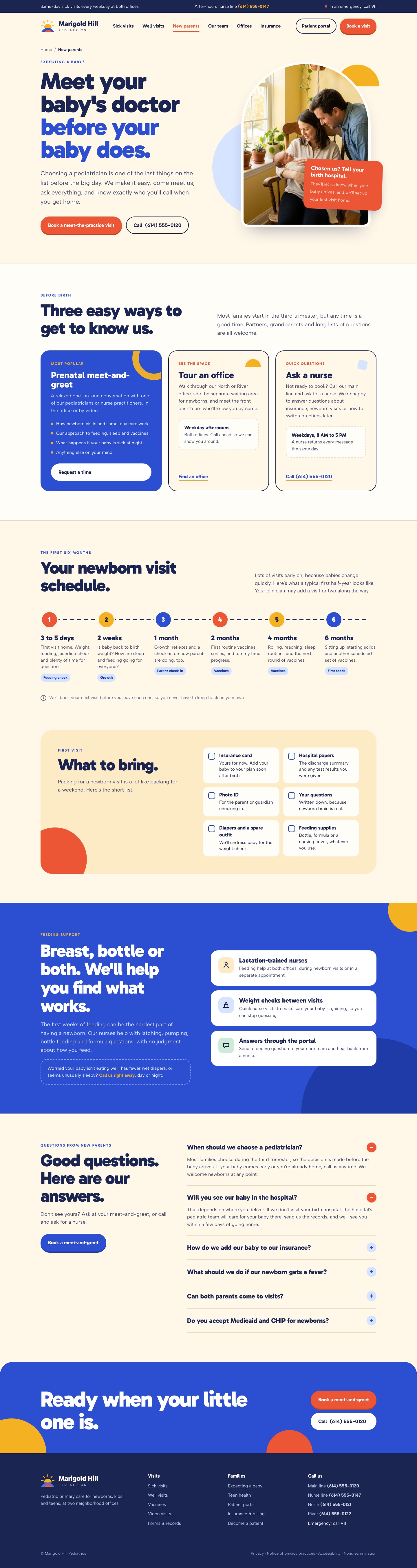
- New parents: meeting the practice before birth, newborn visits and feeding support.
- Services by age: newborns, toddlers, school-age children and teens.
- Providers: pediatricians and nurse practitioners with their interests and offices.
- Patient portal and forms: links to the portal, school and sports forms and records requests.
Clear guidance without medical advice
Parents look for guidance on fevers, rashes and vaccines. Your clinicians supply and approve that content. We structure it so it is easy to find, clearly dated and always points to calling the office when in doubt.
Booking and portals
Scheduling and patient portals usually live in your practice management system. We link or embed them clearly so parents can book or message the office in a few taps, and we keep tracking off pages that could reveal a child's health information.
Choosing a platform
WordPress suits larger groups with several offices and a library of parent resources. Webflow gives your team a visual editor with collections for providers, offices and resources. Framer fits a single-office practice that wants a warm, simple site. Compare the platforms.
How a pediatric website project runs
- Define: we review your current site, offices, booking and after-hours process, then agree the pages and who does what.
- Design: we design the urgent and new-parent paths with your team.
- Build and review: we build the site, connect booking and the portal and test it on phones first.
- Launch and hand over: we launch, redirect old pages and show your team how to update hours, providers and resources.
Marigold Hill Pediatrics
Pediatric practice website. Select a view to see the full design.


Frequently asked questions
Can parents book sick visits online?
Yes, if your scheduling system supports same-day online booking. Otherwise the phone number and booking guidance sit at the top of every page.
How should after-hours information be shown?
Clearly and on every page: when to call the nurse line, when to go to urgent care and when to call 911, approved by your clinicians.
Can we have a page for expectant parents?
Yes. A new parents page introduces the practice, explains newborn visits and lets families schedule a meet-the-doctor visit.
Who writes the health guidance?
Your clinicians supply and approve it. We organize it into clear, dated pages that are easy for parents to scan.
How much does a pediatric website cost?
Every proposal is based on the actual scope: offices, providers, booking and portal links, parent resources and any migration. Tell us about your practice and we will recommend a scope and send a clear proposal.
Tell us about your project
Share what you are planning, the platform you prefer and any timing. We will review it and follow up with the next step.