Primary care website design
A primary care website is used by new patients choosing a doctor and by existing patients who need to book, message the office or find a form. We design and build primary care, family medicine and internal medicine websites that make both easy, on WordPress, Webflow or Framer.
What a primary care website needs to do
New patients want to know whether you are accepting patients, which insurance you take and who they will see. Existing patients want the portal, same-day appointments, refill requests and office hours. The site should serve both groups without either one getting in the other's way.
Pages most primary care practices need
- New patients: whether you are accepting patients, how to register and what to bring.
- Services: annual physicals, chronic condition management, sick visits, vaccines, women's and men's health and any in-house lab or testing.
- Providers: physicians and advanced practice providers, their interests and offices.
- Insurance and payment: the plans you accept and self-pay options.
- Patient portal and requests: booking, messaging, refill requests and forms.
- Locations and hours: offices, hours, after-hours guidance and urgent care options.
Membership and direct primary care
Some practices offer membership or direct primary care. We design pages that explain what membership includes, how it works and how to join, with pricing shown the way you prefer.
Portals and privacy
Booking, messaging and refills usually live in your EHR's patient portal. We link to it clearly and keep tracking off pages where it could reveal health information.
Choosing a platform
WordPress suits larger groups with many providers, offices and resources. Webflow gives your team a visual editor with collections for providers, services and locations. Framer fits a single practice or direct primary care clinic that wants a polished, simple site. Compare the platforms.
How a primary care website project runs
- Define: we review your current site, services, providers, offices and portal, then agree the pages and who does what.
- Design: we design the new patient and existing patient paths with your team.
- Build and review: we build the site, connect the portal and booking and test it across devices.
- Launch and hand over: we launch, redirect old pages and show your team how to update providers, hours and services.
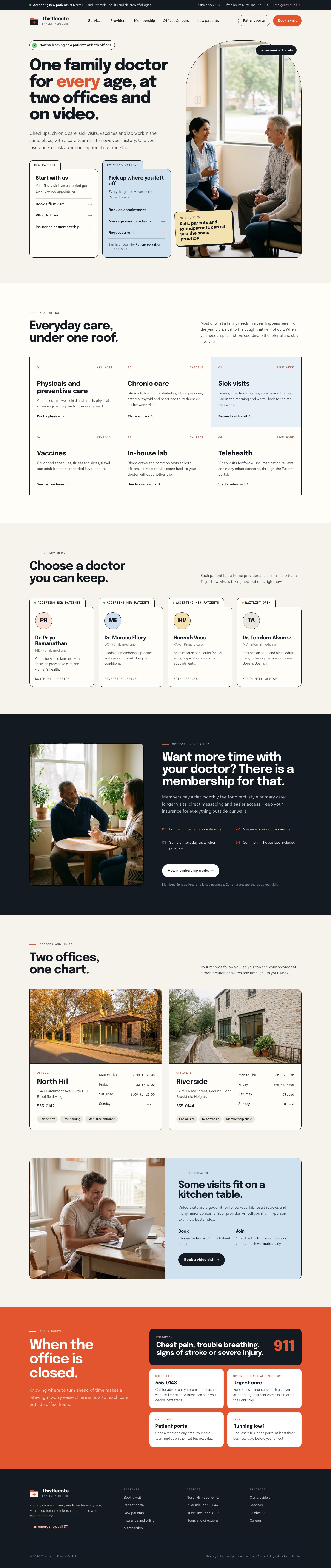
Thistlecote Family Medicine
Primary care practice website. Select a view to see the full design.


Frequently asked questions
Can we show which providers are accepting new patients?
Yes. Availability can be a simple field on each provider profile that your team updates in the CMS.
Can patients book and request refills through the website?
The website links clearly to your patient portal and booking tools, so those tasks are one tap away from every page.
Do you build sites for direct primary care practices?
Yes. Membership pages explain what is included, how it works and how to join.
How should after-hours information be shown?
On every page: how to reach an on-call provider, when to use urgent care and when to call 911, approved by your clinicians.
How much does a primary care website cost?
Every proposal is based on the actual scope: providers, offices, services, portal links, content and any migration. Tell us about your practice and we will recommend a scope and send a clear proposal.
Tell us about your project
Share what you are planning, the platform you prefer and any timing. We will review it and follow up with the next step.